Top 10 AI Marketing Apps & Benefits – Power of Artificial Intelligence
3 years ago10 Types of Google Ads You Should Know About!
1 year ago -

Are you struggling to get CTR due to Zero click searches? You’re not alone. Google provides users with direct, quick, and voice answers without requiring a visit to your website. SEO is evolving very fast. Which is why, with so many types of Google Ads available, it’s easy to feel overwhelmed and unsure where to invest your precious marketing budget.
Don’t let confusion cost you customers and revenue. Understanding the different types of Google Ads is crucial for maximizing your online presence and achieving your business goals. Whether you’re looking to boost website traffic, increase sales, or enhance brand awareness, there’s a perfect ad type waiting for you.
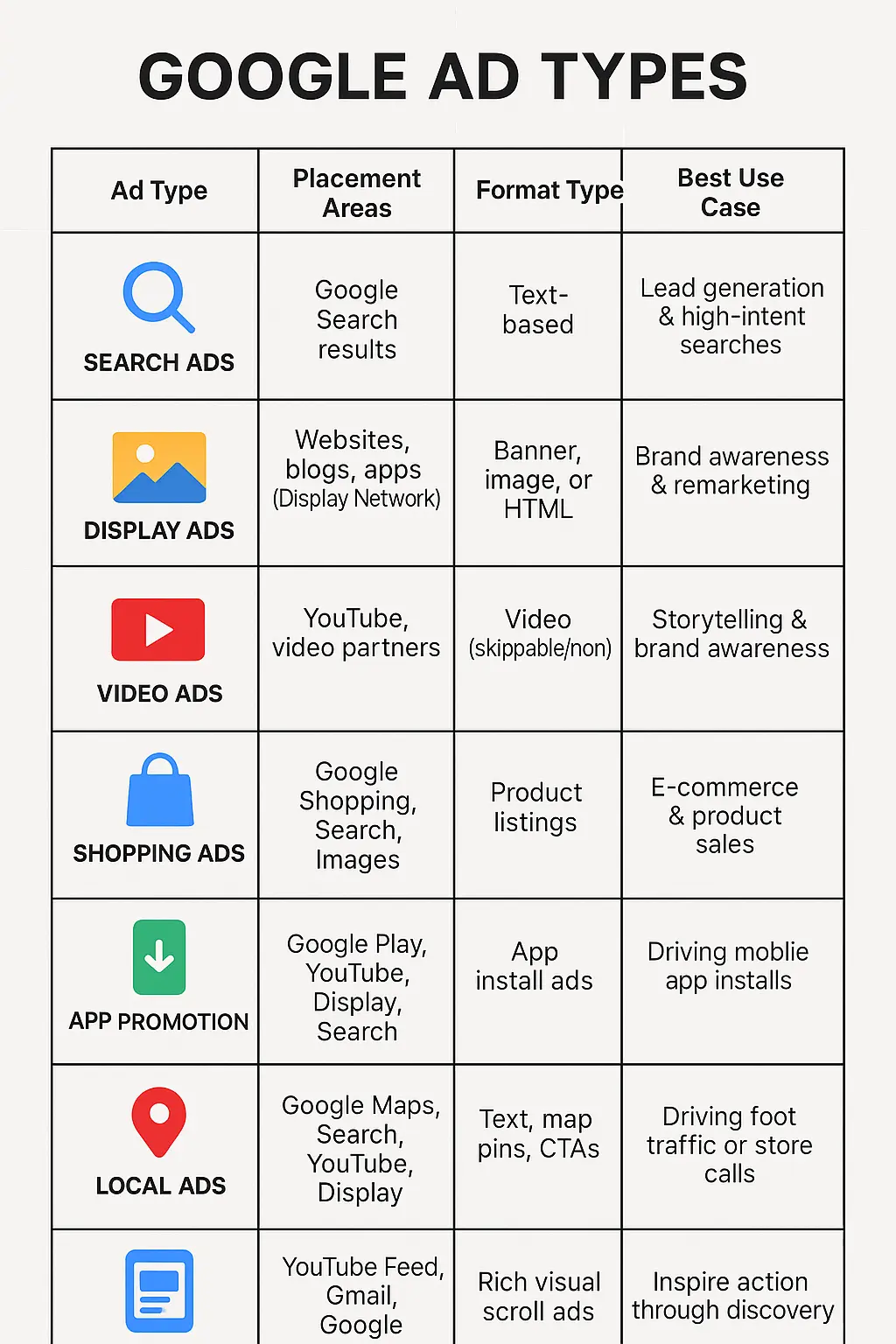
How many types of Google Ads are there? There are 9 core types of google ads campaign in 2026: Search, Display, Video, Shopping, Demand Gen, Performance Max, App, Smart, and the separate Local Services Ads platform. Legacy Local campaigns now run inside Performance Max, and Discovery campaigns became Demand Gen in 2024. Each type serves ads on different Google surfaces and suits different goals, which this guide breaks down one by one.
Table of Contents
10 Types of Google Ads in Digital Marketing
- Google Search Ad campaigns
- Google Display Ad campaigns
- Video Ad campaigns
- Google Shopping Ad campaigns
- Google Demand Gen campaigns (replaced Discovery)
- Google Performance Max campaigns
- Google Smart campaigns
- Google App Promotion Ad campaigns
- Google Local Ad campaigns (legacy — now inside Performance Max)
- Google Local Services Ads
1. Google Search Ad campaigns
Google Search Ad campaigns are a cornerstone of digital advertising, offering businesses a powerful way to reach potential customers actively searching for products or services. Search campaigns put text ads at the top of Google results the moment someone searches for what you sell. They remain the highest-intent ad type Google offers: the user has told you what they want, and your ad answers.
One correction to older guides you may have read (including an earlier version of this one): classic “text ads” no longer exist. Google sunset Expanded Text Ads in June 2022. Every Search campaign you build today uses one of these formats:
- Responsive Search Ads (RSAs): The default and only standard Search format. You supply up to 15 headlines and 4 descriptions, and Google’s system tests combinations against each query to serve the best-performing mix. Pin a headline to position 1 if you need brand or compliance control.
The text ads consist of:
- Headline (up to 3, 30 characters each)
- Description (up to 2, 90 characters each)
- Display URL
- Final URL
- Call ads: Built for mobile. The headline is your clickable phone number, so a tap starts a call instead of a site visit. Pair these with call tracking, or you will never know which keywords drive the phone to ring.
- Dynamic Search Ads (DSAs): Google writes the headline from your page content and matches it to relevant queries. Useful for large sites with hundreds of products or service pages, you could never cover with manual keywords.
- AI Max for Search: Officially introduced in 2025 and now generally available, AI Max is a one-click setting that layers broader query matching and AI-generated ad text onto an existing Search campaign. Treat it as an expansion lever, not a replacement for keyword strategy, and watch your search terms report closely after enabling it.
2. Google Display Ad campaigns
2026 update: Google is retiring from Display campaigns. Starting in June 2026, advertisers can voluntarily migrate Display campaigns into Demand Gen, where Google Display Network inventory now lives alongside YouTube, Discover, Gmail, and Maps. New Display-only campaigns will eventually be created inside Demand Gen rather than as a separate type. You can still run GDN-only placements; you just manage them from Demand Gen. If you run Display today, review your placement exclusions and brand safety settings before migrating rather than waiting for the automatic move.
Google Display Ad campaigns offer a variety of ad formats, each designed to capture audience attention in unique ways. Let’s explore the various types of Google Display ads:
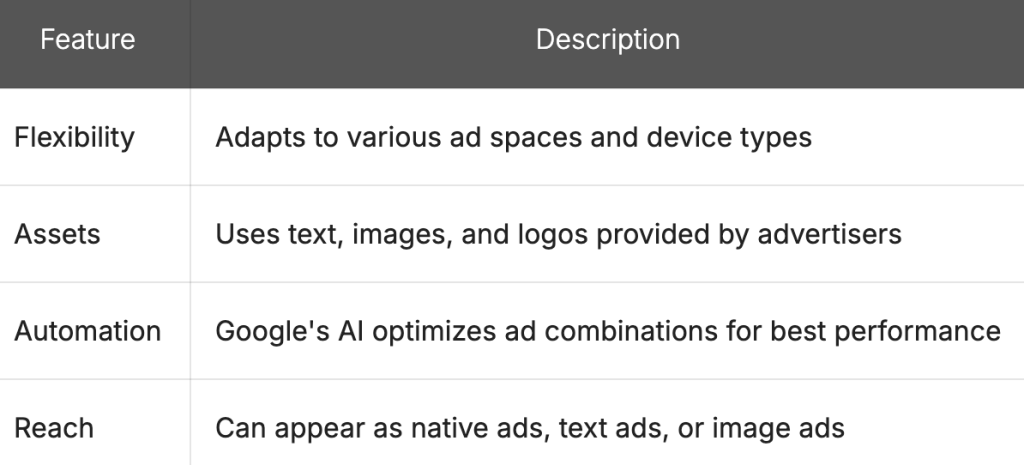
- Responsive Display Ads: Responsive Display Ads are the most versatile and adaptable format. They automatically adjust their size, appearance, and format to fit available ad spaces across the Google Display Network. Here’s a breakdown of their key features:
- Image Ads: Image ads are static visual advertisements that come in various sizes and formats. They allow advertisers to showcase their products or services with eye-catching graphics. Key points include:
- Available in standard IAB sizes
- Can be created using Google Ads or uploaded as image files
- Ideal for brand awareness and visual storytelling
- Video Ads: Video ads on the Display Network can appear in-stream (before, during, or after other videos) or as standalone ads on websites. They offer:
- Engaging audiovisual content
- Various lengths (6, 15, or 30 seconds)
- Options for skippable and non-skippable formats
- Rich Media Ads: Rich media ads are interactive advertisements that can include multiple types of media. They offer:
- Advanced features like video, audio, or games
- Higher engagement rates due to interactivity
- Ability to expand, float, or peel down
- Native Ads: Native ads blend seamlessly with the website content as they appear on it, matching the look and feel of the platform. Benefits include:
- Less intrusive user experience
- Higher engagement rates
- Better brand perception
- Lightbox Ads: Lightbox ads are interactive display ads that expand into a full-screen ad unit when users hover over them. They provide:
- Immersive brand experiences
- Ability to showcase multiple products or features
- Higher engagement due to user-initiated expansion
- Gmail Ads: Although technically part of the Display Network, Gmail ads appear in the Promotions and Social tabs of Gmail inboxes. They offer:
- Targeted reach to Gmail users
- Expandable ad format with rich media options
- Pay-per-click pricing model
3. Video Ad campaigns – Google Video ad types
Video advertising has become increasingly popular in recent years, and Google offers several types of video ad formats to help businesses reach their target audience effectively. Let’s explore the various types of Google Video ads and their unique features:
Note that Video Action Campaigns were folded into Demand Gen in mid-2025, so conversion-focused video buying now happens there. Video campaigns remain the home for awareness formats: skippable and non-skippable in-stream, bumpers, in-feed, and mastheads.
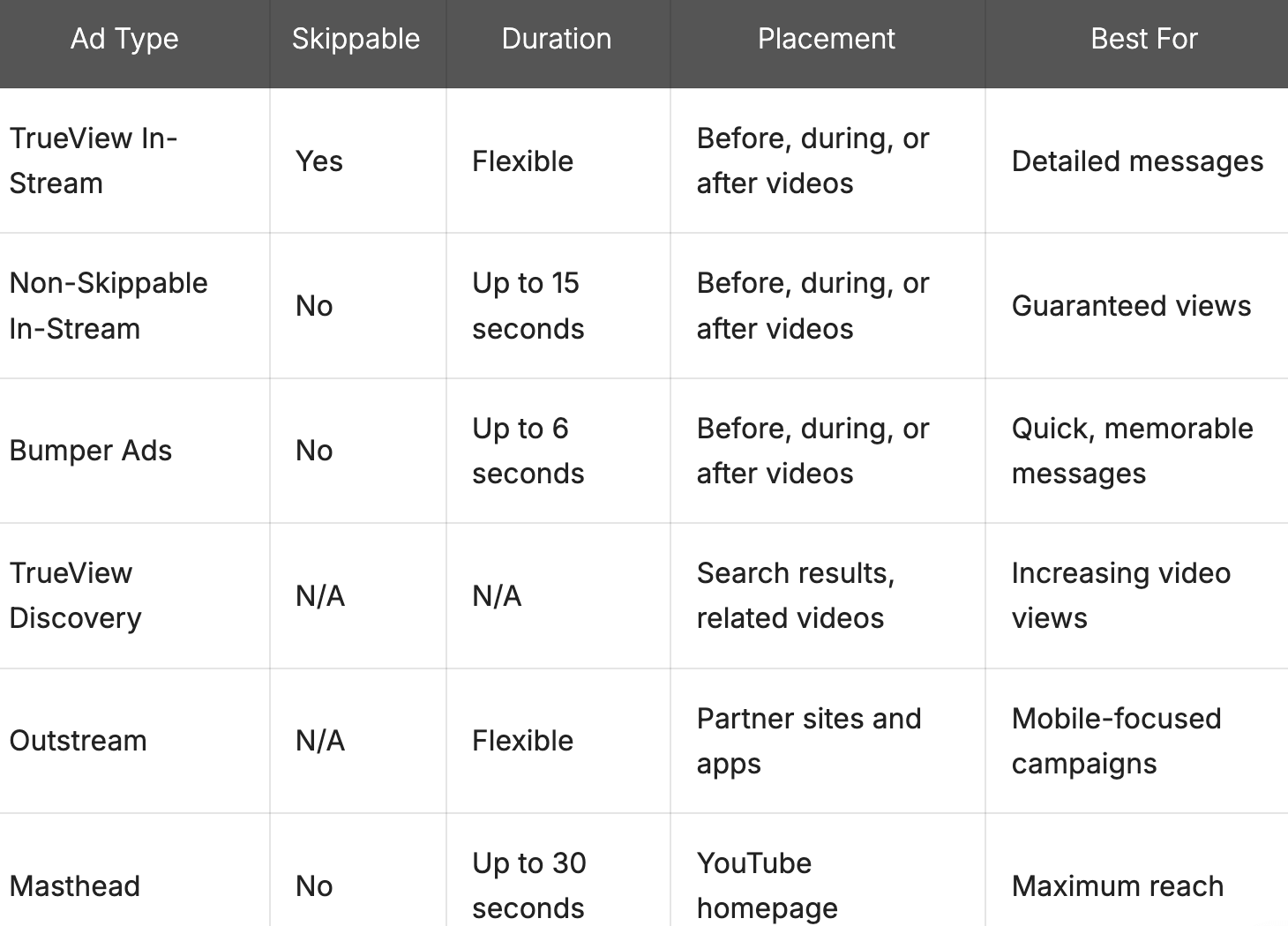
- TrueView In-Stream Ads: TrueView In-Stream ads are perhaps the most common type of video ad on YouTube. These ads play before, during, or after other YouTube videos. Viewers can typically skip these ads after 5 seconds, which is why they’re often referred to as “skippable” ads.
- Non-Skippable In-Stream Ads: As the name suggests, these ads cannot be skipped by viewers. They can be up to 15 seconds long and appear before, during, or after other videos. Non-skippable ads are great for ensuring your message is delivered, but may lead to viewer frustration if not executed well.
- Bumper Ads: Bumper ads are short, non-skippable video ads that last up to 6 seconds. They’re designed to deliver a quick, memorable message and work well for brand awareness campaigns.
- TrueView Discovery Ads: These ads appear in YouTube search results, related videos, and the YouTube homepage. They consist of a thumbnail image from your video with some text, and when clicked, they lead to the full video.
- Outstream Ads: Outstream ads are mobile-only video ads that appear on partner websites and apps outside of YouTube. They start playing without sound when they come into view, giving users the option to unmute and watch.
- Masthead Ads: Masthead ads are premium ad placements that appear at the top of the YouTube homepage for 24 hours. They autoplay for up to 30 seconds without sound and can be an effective way to reach a large audience quickly.
Rename “TrueView Discovery Ads” → In-feed video ads. New copy: “In-feed video ads: Formerly TrueView Discovery ads, these show a thumbnail and text in YouTube search results, the home feed, and next to related videos. Users click to watch, so you only reach people who choose to engage.”
4. Google Shopping Ad campaigns
Google Shopping Ad campaigns offer businesses a powerful way to showcase their products directly in search results. Shopping campaigns pull product data from your Google Merchant Center feed and show image, title, and price directly in results. No keywords: your feed quality decides which queries you appear for, which makes feed optimization the real ranking work.
1. Product Shopping ads: Product Shopping ads are the most common type of Google Shopping ads. The standard format. A single product card with image, title, price, and store name, shown on the Search results page, the Shopping tab, and partner sites. Best for promoting specific SKUs to buyers comparing options.
Key features:
- High-quality product image
- Product title
- Price
- Retailer name
- Optional elements (e.g., reviews, promotions)
These ads appear in Google Search results, on the Shopping tab, and on partner websites. They’re ideal for businesses looking to promote specific products and drive direct sales.
2. Local inventory ads: Local inventory ads help brick-and-mortar stores promote their in-store products to nearby shoppers. These ads show real-time local inventory information, helping drive foot traffic to physical stores. Example of local inventory ads: For retailers with physical stores. These show real-time in-store availability, store location, and a “pick up today” option, turning nearby searchers into foot traffic.
Key features:
- Product image and details
- Local availability information
- Store location and directions
- “Pick up today” option
Local inventory ads are excellent for retailers with physical locations looking to bridge the gap between online browsing and in-store purchases.
3. Performance Max with a product feed: Google merged Smart Shopping into Performance Max in 2022. Connect your Merchant Center feed to a PMax campaign, and your products serve across Search, Shopping, YouTube, Gmail, Discover, and Display from one campaign with automated bidding.
Key features:
- Automated ad creation and placement
- Dynamic remarketing capabilities
- Cross-network reach (Search, Display, YouTube, Gmail)
- Simplified campaign management
These ads are ideal for advertisers looking to maximize their reach and efficiency across various Google platforms with minimal manual intervention.
5. Google Demand Gen campaigns (replaced Discovery)
Discovery campaigns no longer exist. Google replaced them with Demand Gen in late 2023, and the migration finished by early 2024. If your account still references Discovery, you are looking at old reporting.
Demand Gen serves image and video ads across Google’s most visual surfaces: YouTube (including Shorts and in-stream), the Discover feed, Gmail’s Promotions and Social tabs, and now Google Maps through promoted pins. With Display inventory moving in from June 2026, Demand Gen is becoming Google’s single home for visual, feed-based advertising.
The name describes the job. Search captures demand that already exists; Demand Gen creates it by putting your brand in front of people who match your buyer profile before they search.
What makes Demand Gen different:
- Lookalike-style audience expansion built from your customer lists and site visitors (shifting to AI-powered audience signals through 2026)
- A/B experiments for creative testing inside the campaign
- Product feed support for shoppable ads
- Maps-only campaigns, new in 2026, are useful for location-driven businesses in markets like Nepal, where map searches drive walk-ins
- View-through conversion optimization for measuring buyers who saw your ad and converted later without clicking
When to choose it: strong visual creative, an awareness or consideration goal, and conversion tracking already in place. Budget guidance floating around the industry suggests roughly $75/day per campaign as a workable floor; below that, the algorithm struggles to learn. If your goal is pure last-click conversion capture, Performance Max or Search will serve you better. A useful way to split them: Demand Gen creates intent; Performance Max captures it.
- Also read: B2B lead generation strategies
6. Google Performance Max campaigns
Performance Max campaigns are Google’s latest offering, providing a comprehensive approach to advertising across all of Google’s ad inventory. These campaigns use advanced machine learning to optimize performance based on your specific goals.
Benefits of Performance Max:
- Access to all Google ad channels
- Goal-based optimization
- Automated bidding and targeting
- Enhanced audience insights
7. Google Smart Ad campaigns
Google Smart campaigns are designed for small businesses looking for a simplified advertising solution. These ads use machine learning to optimize ad placements and targeting across various Google networks.
Key features of Smart Ads:
- Automated ad creation and optimization
- Simplified setup process
- Cross-platform reach (Search, Display, Maps)
- Local business focus
8. Google App Promotion Ad campaigns
Google App Promotion Ad campaigns are specifically designed to promote mobile applications. These ads appear across Google’s properties, including Search, Play Store, YouTube, and the Display Network.
App Ad features:
- Automated ad creation
- App install focus
- In-app action optimization
- Cross-platform reach
9. Google Local Ad campaigns (legacy – now inside Performance Max)
Standalone Local campaigns no longer exist as a campaign type. Google migrated them into Performance Max in 2022, so you will not find “Local” in the campaign type picker anymore. The goal they served still exists; it just lives elsewhere.
To run local ads today, create a Performance Max campaign with the “Local store visits and promotions” goal:
How to set up a Google Ads Local campaign
Setting up a Local campaign involves several steps:
- Sign in to Google Ads and create a new campaign
- Choose the objective: Local store visits and promotions
- Google selects Performance Max as the campaign type
- Link your Business Profile so your locations, photos, and reviews feed the ads
- Set budget, bidding (store visits or calls), and location targeting
- Upload asset groups: images, videos, headlines, descriptions, logo
- Review and launch
Your ads then serve across Search, Maps, YouTube, Display, and Gmail, optimized toward driving people through your door. For a full walkthrough of account setup, see our guide to Google Ads setup in Nepal.
Also worth watching: Demand Gen’s new Maps promoted pins (see above) now offer a second route to map visibility that never existed under the old Local campaigns.
10. Google Local Services Ads
Local Services Ads are specifically for service-based businesses. These ads appear at the top of Google Search results when users look for local services, showcasing your business information and customer reviews.
Benefits of Local Services Ads:
- Trust badges for verified businesses
- Pay-per-lead model
- Prominent placement in local search results
- Direct booking and contact options
Key Features of Each Type of Google Ad
| Ad Type | Primary Purpose | Best For | Targeting Options |
|---|---|---|---|
| Search | Reach users actively searching | Immediate purchase intent | Keywords, location |
| Display | Visual ads across websites | Brand awareness | Interests, demographics |
| Video | Engage users on YouTube | Brand storytelling | Topics, placements |
| Shopping | Showcase products | E-commerce businesses | Product feed |
| Smart | Automated, easy setup | Small businesses | Automated by Google |
| Performance Max | Cross-channel automation | Comprehensive campaigns | Goals, assets |
| App | Promote mobile applications | App developers | App stores, placements |
| Demand Gen | Visual ads across YouTube, Discover, Gmail, and Maps | Creating demand before search | Audience signals, lookalike expansion |
| Local (legacy) | Now runs via Performance Max store goals | Brick-and-mortar businesses | Location, Business Profile |
| Local Services | Connect with local customers | Service-based businesses | Service categories, location |
What’s the best type of Google ad for you?
Now that we’ve explored the various types of Google ads available, you might be wondering which one is the best fit for your business. The truth is, there’s no one-size-fits-all answer. The ideal ad type depends on your specific goals, target audience, and budget.
Let’s break down some key factors to consider when selecting the best Google ad type for your business.
Assessing Your Marketing Objectives
Before diving into ad types, it’s crucial to clearly define your marketing objectives. Are you looking to:
- Increase brand awareness?
- Drive more traffic to your website?
- Generate leads?
- Boost sales of specific products?
- Promote local foot traffic to your physical store?
Your primary goal will significantly influence which ad type is most suitable for your campaign.
Understanding Your Target Audience
Knowing your audience is paramount in choosing the right ad type. Consider:
- Where does your audience spend most of their time online?
- What devices do they primarily use?
- At what stage of the buying journey are they?
For instance, if your target audience frequently watches YouTube videos, Video campaigns might be an excellent choice. If they’re more likely to be browsing websites, Display ads could be more effective.
Evaluating Your Budget and Resources
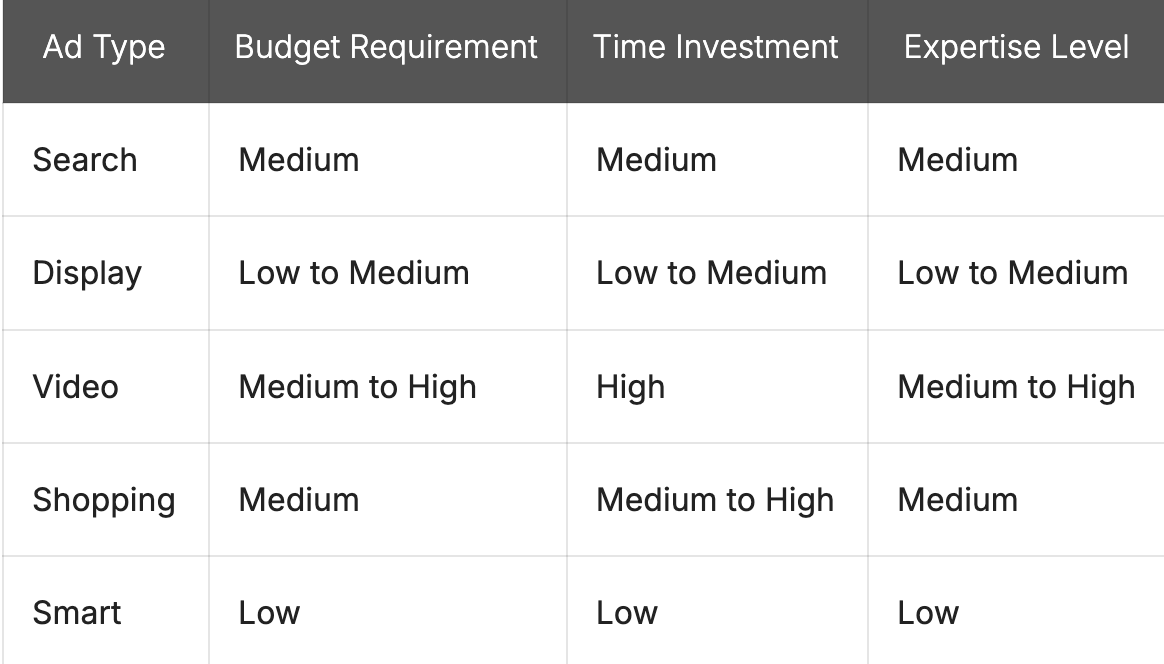
Different ad types require varying levels of investment, both in terms of budget and resources. Here’s a comparison of some ad types based on typical resource requirements:
Matching Ad Types to Business Goals
Let’s look at how different ad types align with various business objectives:
- For Brand Awareness:
- Display campaigns
- Video campaigns
- Discovery campaigns
- For Driving Website Traffic:
- Search campaigns
- Display campaigns
- Performance Max campaigns
- For Lead Generation:
- Search campaigns
- Display campaigns with lead form extensions
- For E-commerce Sales:
- Shopping campaigns
- Performance Max campaigns
- Search campaigns with product extensions
- For Local Business Promotion:
- Local campaigns
- Local Services Ads
Are you wasting money on Google Ads?
Google Ads can be a powerful tool for businesses to reach their target audience, but it’s also easy to waste money if not managed properly. Here are some common ways advertisers might be wasting their budget:
- Poor keyword selection
- Neglecting negative keywords
- Ineffective ad copy
- Ignoring quality score
- Improper budget allocation
Auditing a Google Ads account takes an hour. Fixing what the audit finds takes experience. If you would rather spend your budget on customers than on learning curves, get in touch for a Google Ads account review – I will tell you where the money is leaking before you spend another rupee on it.
Let’s dive deeper into each of these pitfalls and explore strategies to overcome them.
1. Poor Keyword Selection
Choosing the right keywords is crucial for the success of your Google Ads campaigns. Many advertisers make the mistake of targeting broad, generic keywords that may not align with their specific offerings or audience intent.
Tips to improve keyword selection:
- Focus on long-tail keywords
- Use keyword research tools
- Analyze search intent
- Consider keyword match types
2. Neglecting Negative Keywords
Negative keywords are often overlooked but play a vital role in preventing your ads from showing up for irrelevant searches. By not using negative keywords, you risk wasting budget on clicks that are unlikely to convert.
How to effectively use negative keywords:
- Regularly review the search terms report
- Add irrelevant terms as negative keywords
- Use negative keyword lists
- Consider industry-specific negative keywords
3. Ineffective Ad Copy
Your ad copy is the first impression potential customers have of your business. Poorly written or generic ad copy can lead to low click-through rates and wasted impressions.
Strategies for creating compelling ad copy:
- Highlight unique selling points
- Include strong call-to-actions
- Use ad extensions effectively
- A/B test different ad variations
4. Ignoring Quality Score
Quality Score is Google’s rating of the quality and relevance of your keywords and PPC ads. A low Quality Score can lead to higher costs per click and lower ad positions.
Ways to improve Quality Score:
- Improve landing page relevance and user experience
- Enhance ad relevance to keywords
- Optimize click-through rate (CTR)
- Maintain account-level Quality Score
5. Improper Budget Allocation
Allocating your budget effectively across campaigns and ad groups is crucial for maximizing ROI. Many advertisers make the mistake of spreading their budget too thin or not adjusting based on performance.
Tips for better budget allocation:
- Prioritize top-performing campaigns
- Use data-driven budget decisions
- Implement dayparting strategies
- Consider seasonal trends
Signs You Might Be Wasting Money in Google Ads
- High spend with low conversions
- Poor click-through rates
- High bounce rates on landing pages
- Low Quality Scores across keywords
- Irrelevant search terms triggering your ads
If you notice any of these signs in your Google Ads account, it’s time to take action and optimize your campaigns.
Strategies to Reduce Wasted Ad Spend
- Regular Account Audits: Conduct thorough audits of your Google Ads account at least quarterly to identify areas of improvement and potential waste.
- Implement Conversion Tracking: Ensure proper conversion tracking is set up to accurately measure the effectiveness of your campaigns.
- Use Automated Bidding Strategies: Leverage Google’s machine learning capabilities with automated bidding strategies like Target CPA or Target ROAS.
- Refine Audience Targeting: Utilize audience targeting options to reach users more likely to convert, such as remarketing lists or in-market audiences.
- Optimize Landing Pages: Ensure your landing pages are relevant, fast-loading, and optimized for conversions to improve Quality Score and reduce wasted clicks.
FAQs: Types of Google Ads
How many types of Google Ads are there in 2026?
There are 9 core types of Google Ads campaigns: Search, Display, Video, Shopping, Demand Gen, Performance Max, App, Smart, plus Local Services Ads, which run on its own platform. Older guides list Discovery and Local campaigns, but Discovery became Demand Gen, and Local campaigns merged into Performance Max.
Which type of Google Ads is best for small businesses?
Start with Search campaigns for immediate leads, since they capture people already looking for you. Smart campaigns suit owners with no time to manage ads. Service businesses like plumbers, lawyers, and clinics should test Local Services Ads first because you pay per lead, not per click.
What is the difference between Search Ads and Display Ads?
Search ads are text ads shown to people actively searching for your product, so they convert at higher rates. Display ads are visual banners shown across websites while people browse, better for awareness and retargeting. Search captures demand; Display builds it.
What replaced Google Discovery Ads?
Display and Demand Gen impressions cost the least per click, but “cheap” clicks convert less often. Judge cost by cost-per-conversion instead. Local Services Ads often win for service businesses because you pay only when a qualified lead calls or messages.
- How to Learn Digital Marketing Online FREE – Get Certified
- What Is Viral Marketing? Strategy, Examples & the 2026 Playbook
- 6 Free Best SEO Tools & Automated SEO Tools for Websites
- How to Write AI Video Generation Prompts Like a Pro?

Popular Post
![[2026 Updated] Top 10 Digital Marketing Agencies in Nepal Ranked!](https://mysticrubs.com/wp-content/uploads/2022/05/top-10-digital-marketing-company-in-nepal.png)
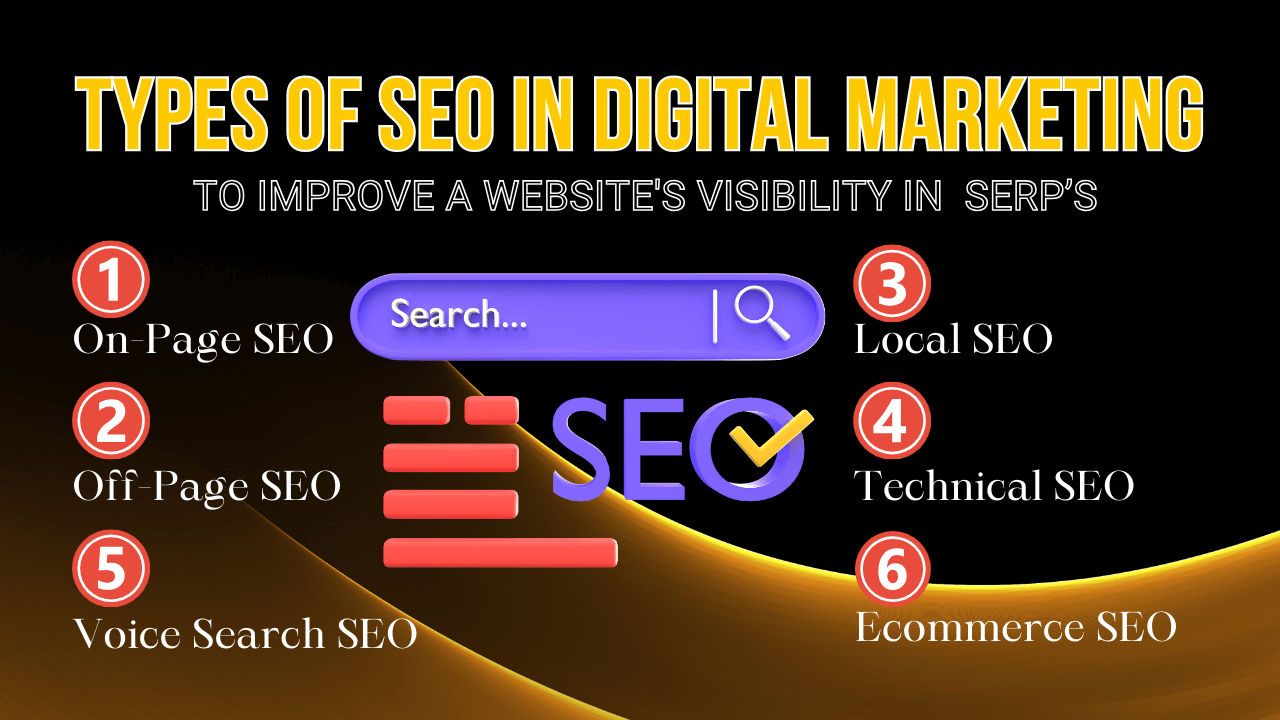
What Are the Types of SEO in Digital Marketing?
3 years ago



100% Best FREE SEO TOOLS 2026 for SEO Ranking
5 years ago